
10 Ways to Make Your Home Office Easier to Reset at the End of the Day
Brandon Galloway | September 23, 2026
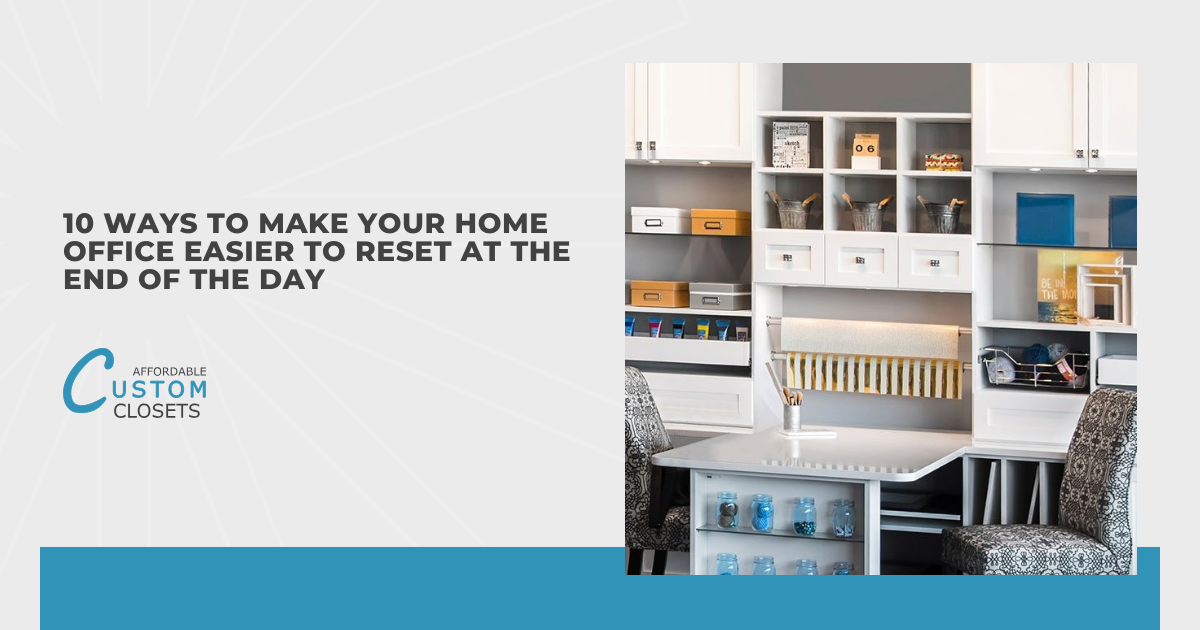
Your home office can look manageable at a glance while still making it harder to focus, find what you need, and wrap up the day efficiently. Loose papers, charging cords, notebooks, and everyday supplies pile up quickly without a clear system in place. In my experience, even a well-used office becomes easier to maintain when everything has a logical home and the layout supports how you actually work.
A workspace that's easy to reset starts with choices that reduce friction rather than add steps. The best setups help you clear surfaces, contain daily clutter, and keep essentials within reach without crowding the room. When your space supports a quick reset, it's easier to end the workday calmly and return to a desk that's ready to use.
If your home office keeps sliding back into clutter no matter how often you clean it, the fix is usually a system, not more effort. Here are 10 ways to make your workspace easier to reset at the end of each day:
- Create designated storage zones for everything
- Build a quick daily declutter routine
- Tame the chaos with smart cable management
- Add custom closet solutions built for your space
- Keep a clear, clutter-free desk surface
- Use drawer organizers and dividers
- Set up a "landing spot" for daily essentials
- Go paperless with a simple filing system
- Label shelves, bins, and baskets
- End each day with a 5-minute closing ritual
From simple daily habits to smarter storage, every tip here helps your home office feel organized and ready the moment you sit back down.
Create Designated Storage Zones for Everything
Your home office resets faster when items live in clear zones instead of floating wherever there's open space. Group similar things together, so supplies, tech, paperwork, and reference materials each get their own defined home. When you always know where a stapler or charging cable belongs, tidying up stops feeling like a chore and starts taking seconds. I've found that most clutter isn't really a mess problem, it's a missing-address problem.
Set up zones based on how you actually move through your workday, not just where furniture happens to sit. Keep daily tools within arm's reach and push rarely used items to higher shelves or deeper drawers. Reserve one zone for active projects and another for things you're done with but still need to file. Good zoning means your desk clears itself out because everything already has a place to go back to.
I also believe accessibility is a big part of a system that sticks, since a zone you can't reach easily gets ignored fast. Match each zone to a habit, so wrapping up your day feels natural instead of forced. Once your home office is divided into practical areas, the end-of-day reset becomes almost automatic. You'll spend less energy deciding where things go and more time simply putting them away.
Build A Quick Daily Declutter Routine
Even the best storage setup falls apart without a short habit that keeps it running. Give yourself three to five minutes at the end of each workday to put things back where they belong before you log off. Small, consistent tidying beats the occasional deep clean because clutter never gets a chance to pile up. I've noticed that people who build a quick reset into their routine rarely lose an afternoon to a full-scale cleanup later.
Keep your daily routine simple enough that you'll actually stick with it. Here's what a solid end-of-day reset usually covers:
- Clear Your Desk Surface: Return pens, notebooks, and gadgets to their zones so your workspace starts empty tomorrow. Clean surfaces make it far easier to focus first thing in the morning.
- Deal with Loose Paper: Sort each stray sheet into a file, an action tray, or the recycling bin. Handling paper daily stops it from swallowing your desk by week's end.
- Reset Your Tech: Coil charging cables, dock your laptop, and stash headphones in their spot. Tucked-away cords keep your home office looking calm instead of tangled.
Anchor the routine to something you already do, like your last email or your final coffee refill, so it becomes second nature. I like tying the reset to a natural stopping point because it removes the guesswork about when to start. Once the habit sticks, you'll close out each day with a workspace that's genuinely ready for the next one. Try running through your own version tonight and see how much lighter tomorrow's start feels.
Tame The Chaos with Smart Cable Management
Few things drag down a clean workspace faster than a nest of cords under your desk. Chargers, monitor cables, and power strips tend to tangle into one messy knot that catches dust and makes your home office feel unfinished. When wires are managed well, your reset takes seconds because there's nothing to untangle or trip over at the end of the day. I've seen tidy cables transform how a room feels more than almost any other quick fix.
Get your cords under control with a few simple tools that keep everything in its place:
- Cable Trays and Channels: Mount a tray beneath your desk to lift power strips and excess cord off the floor. Clear floors mean easier cleaning and a calmer look every single time you sit down.
- Velcro Ties and Clips: Bundle loose cables and clip them along the desk edge so they stay put. Reusable ties let you adjust things fast whenever you add or swap a device.
- Labeled Cords: Tag each cable at both ends so you know exactly what unplugs what. Quick labels save you from crawling around and guessing during your end-of-day wrap-up.
I always tell clients to route cables once and route them right, since a good setup keeps working long after the effort's done. Give your daily-use cords a dedicated dock or hook so they're ready without hunting through a pile. When your home office stays free of cord clutter, closing out the workday feels effortless and your space looks ready for tomorrow.

Add Custom Closet Solutions Built for Your Space
Off-the-shelf furniture rarely fits the exact dimensions or workflow of your room, which leaves awkward gaps and wasted corners. Custom closet solutions solve that by working with your walls, your habits, and the specific items you use daily. When storage is built around how you actually work, your home office resets faster because there's a right-sized spot for everything. I've watched a cramped corner turn into the most functional part of a room once the storage matched the space instead of fighting it.
Here's where custom pieces make the biggest difference in a workspace that needs to reset quickly:
- Built-In Desks and Cabinetry: Fitted units use vertical space and tricky corners that standalone furniture leaves empty. You get more storage without crowding the floor, so tidying up stays quick and simple.
- Adjustable Shelving: Movable shelves flex as your needs shift, from binders one season to bins the next. You won't outgrow the system, which keeps your reset routine steady over time.
- Hidden Storage Compartments: Concealed drawers and closed cabinets tuck clutter out of sight in seconds. Clean sightlines help the whole room feel calmer at the end of a long day.
Good design starts with a real look at what you own and how you move through your day, not a generic template. I like showing clients how a few smart, made-to-measure choices restore order without a full remodel or a bigger footprint. Once your storage is shaped around your actual routine, closing out the workday takes far less effort than you'd expect.
Keep A Clear, Clutter-Free Desk Surface
Your desk surface sets the tone for how the whole room feels, so a clear one makes the end-of-day reset almost effortless. When you leave only what you truly need out in the open, there's very little to tidy before you log off. Empty space also gives your eyes a break, which matters more than folks expect after a long stretch of screen time. I've found that most people underestimate how much a clear surface affects their ability to focus.
Keep only the essentials on top and give everything else a home nearby. Here's what belongs within easy reach:
- Daily-Use Tools: Store a pen, a notepad, and your current project close, then tuck the rest into a drawer. Fewer items on top mean faster cleanup and a workspace that reads as calm.
- One Personal Touch: Pick a single plant or photo that lifts the space without crowding it. Restraint here keeps your desk feeling intentional rather than cluttered with knickknacks.
- A Landing Tray: Set out one small tray for items you'll deal with tomorrow. Containment stops loose bits from creeping across the desk by the end of the week.
Once your surface stays mostly bare, resetting your home office turns into a ten-second habit instead of a nightly project. I like giving each frequently used item a nearby drawer or shelf so clearing the top never means carrying things across the room. Protect that open space and you'll close your laptop to a desk that's genuinely ready for tomorrow. Next, let's look at how drawer organizers keep all those tucked-away items in order.
Use Drawer Organizers & Dividers
Drawers hide clutter well, but an unsorted drawer just moves the mess out of sight and slows you down when you're hunting for a specific pen or sticky note. Organizers and dividers split that open space into clear compartments, so each item has a defined slot instead of sliding around. When your home office drawers are sorted this way, resetting at day's end means dropping things into place rather than shoving them shut. I've found that a well-divided drawer saves more daily time than most people expect.
Match your dividers to what actually lives in each drawer, so the system stays practical rather than pretty for its own sake:
- Adjustable Tray Dividers: Movable trays let you resize compartments as your supplies shift over time. You can widen a slot for chargers one month and split it for smaller items the next.
- Deep Bin Inserts: Taller inserts corral bulkier gear like external drives, cables, and notepads. Contained items stop rolling into one messy jumble every time you open the drawer.
- Shallow Tray Sections: Thin trays keep pens, clips, and sticky notes visible at a glance. Quick visibility means you grab what you need and close the drawer without digging.
Sort each drawer by how often you reach for its contents, keeping daily items up front and seldom-used supplies toward the back. I like assigning one drawer for active work and another for backups, since that split keeps your reset fast and your workflow clear. Once your compartments match your habits, closing out the day stops feeling like a scramble and your home office stays orderly with almost no effort.
Set Up A "Landing Spot" For Daily Essentials
Keys, badges, phones, and notebooks tend to scatter the moment you walk in, and those loose items quietly build the clutter you fight each evening. A dedicated landing spot gives them one home right where you enter or sit down, so nothing drifts across your desk. When your everyday carry has a set place, resetting your home office at day's end takes seconds instead of a full sweep. I've noticed that most stray-item messes come from having no clear drop zone, not from having too much stuff.
Pick a landing spot that matches how you actually enter and leave your workspace, then stock it with pieces that hold your specific essentials:
Wall Hooks and Rails: Mount a small rail near your door for keys, lanyards, and headphones. Vertical storage keeps these items visible and off your desk, so grabbing them on the way out stays quick.
A Shallow Catch Tray: Set one tray for a phone, wallet, and glasses within easy reach. Contained essentials stop rolling loose across the surface and give you one glance to confirm you've got everything.
A Charging Station: Dedicate a corner with a power strip for your phone and earbuds overnight. Devices charge in one spot instead of tangling cords wherever there's an outlet.
Keep the landing spot compact so it holds only true daily-use items, not everything that needs a home. I like placing it at the exact point where your routine starts and ends, since that's where habits actually stick. Once your essentials always land in the same place, closing out the workday feels calm and tomorrow begins without a scavenger hunt.
Go Paperless with A Simple Filing System
Paper is the quiet culprit behind most cluttered desks, since one printout turns into a stack before you notice. Scanning documents and storing them digitally clears your surface and makes files searchable in seconds instead of buried in a drawer. When your home office runs on a lean digital system, your end-of-day reset drops to almost nothing because there's little paper left to sort. I've found that folks who commit to scanning early rarely go back to overflowing trays.
Maintain your digital setup simple enough that filing feels quick rather than like another task on your list:
- Consistent Folder Names: Label folders by category and date so you can find anything in a few clicks. Predictable names beat a sprawling folder tree that leaves you guessing where a file went.
- One Scanning App: Pick a single phone or desktop scanner and route every document through it. Standardizing your tool means you won't waste time deciding how to capture each page.
- A Weekly Purge: Delete duplicates and toss papers you've already scanned each Friday. Regular cleanup stops digital clutter from mirroring the mess you just cleared off your desk.
Set a firm rule for the few papers that truly must stay physical, like signed contracts or warranties, and give them one labeled folder. I like keeping that folder small on purpose, since a tight limit forces you to scan first and hoard less. Once your filing runs mostly digital, closing out the workday means shutting one drawer instead of shuffling through piles. Next, let's look at how clear labels keep your shelves, bins, and baskets working just as smoothly.
Label Shelves, Bins, & Baskets
Bins and baskets keep clutter contained, but unlabeled ones force you to open each container just to remember what's inside. Clear labels turn every shelf into an obvious destination, so putting things away at day's end takes no thought at all. When your home office storage is labeled well, your reset speeds up because you're never second-guessing where an item belongs. I've found that labels do more for daily upkeep than any pricey organizer ever could.
Pick a labeling method that fits how you use each container, then keep it consistent across the room:
- Removable Label Tags: Clip-on or slide-in tags let you rename a bin whenever its contents change. You get a tidy look without adhesive residue, and swapping labels stays quick as your needs shift.
- Color-Coded Baskets: Assign one color per category so you spot the right basket from across the room. Visual sorting cuts your search time and helps everyone in the house respect the system.
- Front-Facing Shelf Labels: Stick clear tags at the front edge of each shelf so contents stay obvious at a glance. Well-placed labels mean you never pull the wrong bin during a rushed cleanup.
Keep your labels simple and readable, since a system nobody understands gets ignored within a week. I like labeling both the container and its spot on the shelf, so items always return to the same place instead of drifting around. Once your bins and baskets announce their own contents, closing out the workday becomes a fast, no-guess routine.
End Each Day with A 5-Minute Closing Ritual
Small daily habits do more for your home office than any single organizing project ever will. Just five minutes at the end of the workday lets you clear surfaces, put items back where they belong, and set up tomorrow before you step away. I've found that clients who build this quick routine walk in each morning to a calm, ready workspace instead of yesterday's leftover mess.
Below are simple closing rituals you can include:
- Reset Your Desk Surface: Clear away mugs, notebooks, and stray papers so your work area starts fresh each morning. You'll skip the mental drag of sorting through clutter before you've even had coffee.
- Return Items to Their Zones: Put pens, chargers, and files back in their designated spots so nothing wanders overnight. Keeping everything in place means you spend less time hunting tomorrow.
- Set Up Your First Task: Leave out only what you need for your next priority so you start with clear direction. Your morning self will thank you for the head start.
Consistency matters more than perfection with a ritual like this. I always recommend tying it to something you already do, like closing your laptop or standing up to leave, so it becomes automatic instead of another chore. Give it a couple of weeks and you'll notice your home office practically resets itself.
Conclusion
Finishing your workday should feel like a clear transition, not the beginning of another cleanup project. When your home office supports the way you naturally work, maintaining order becomes less demanding and easier to sustain over time. Small organizational decisions can remove unnecessary friction, helping you spend less energy managing your surroundings and more time focusing when it matters. Ultimately, a workspace that’s simple to restore gives you something valuable at both ends of the day: a cleaner break when work is finished and a calmer, more prepared place to return to tomorrow.